Simple search
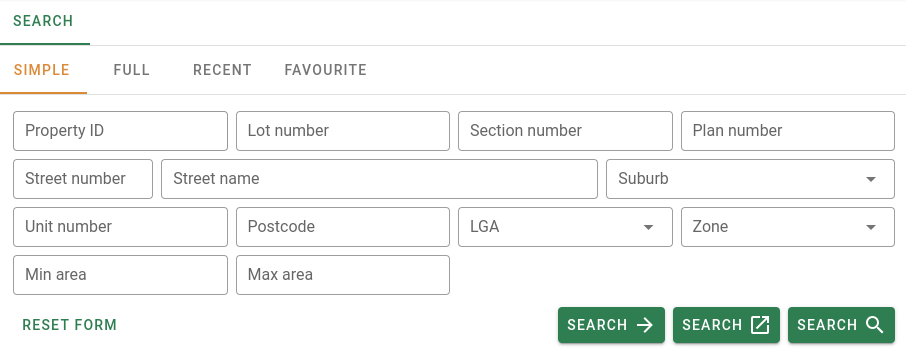
The Simple search is the easiest way to do a search. It contains a collection of input text boxes for each of the different fields that you can search for. You don't need to fill in all the boxes, you can search using just one or more fields.
There are some small changes in the fields for the simple search depending on if you are searching Sales(see sales) or searching Properties (see properties).
Including the LGA in your search will help to speed up the search and return a more accurate result.
Once you have selected the fields you which to include in your search, click on one of the three search buttons to start your search.

The search button will go to the results as a full page.
The search button will go to the results in a new browser tab as a full page.
The button will go to the search results as a tab in the same page, allowing you to open multiple searches at once in the same page.
You can clear the all the search fields by clicking the Reset form button at the bottom left of the form.

Search fields
| Field name | Data type | Default Comparator field is searched by |
|---|---|---|
| Sale ref | Number | Sale reference number. This uses the EQUALS comparator. |
| Property ID | Number | Property identification number (PID). This uses the EQUALS comparator. |
| Dealing number | Text | Dealing number for the sale. This uses the the LIKE comparator. |
| Lot number | Text | Lot number. This uses the INCLUDES comparator. |
| Section number | Text | Section number. This uses the INCLUDES comparator. |
| Plan number | Text | Plan number. This uses the INCLUDES comparator. |
| Unit Number | Text | Unit number. This uses EQUALS comparator. |
| Street number | Text | Street number. This uses MATCHES comparator. |
| Street name | Text | Street name. This uses MATCHES comparator. |
| Suburb | Selection | Suburb. This uses EQUALS comparator. Shows a list of suburbs. |
| LGA | Selection | District (LGA). This uses EQUALS comparator. Shows a list of districts. |
| Zone | Selection | Zones. This uses EQUALS comparator. Shows a list of zones. |
| Postcode | Number | Postcode. This uses EQUALS comparator. |
| Min contract date | Date | Minimum contract date, This uses AFTER comparator. Shows a date picking calender. |
| Max contract date | Date | Maximum contract date. This uses BEFORE comparator. Shows a date picking calender. |
| Min settlement date | Date | Minimum settlement date. This uses AFTER comparator. Shows a date picking calender. |
| Max settlement date | Date | Maximum settlement date. This uses AFTER comparator. Shows a date picking calender. |
| Min price | Number | Minimum price for the sale. This uses GREATER THAN comparator. |
| Max price | Number | Maximum price for the sale. This uses LESS THAN comparator. |
| Min area | Number | Minimum Area. This uses GREATER THAN comparator.. |
| Max area | Number | Maximum area.This This uses LESS THAN comparator. |
| DP/SP | Checkbox | These are checkboxes that when clicked will include the DP and/or SP in your lot and plan search. |
When using Min and Max fields together, the default comparator used is BETWEEN.