

Sale card
A sale card is a compact summary of a sale record, showing a subset of key transaction and property fields. The card displays the sale's current status, a street view image or the first attached photo of the property, and a set of action buttons depending on the sale's source and your account permissions.
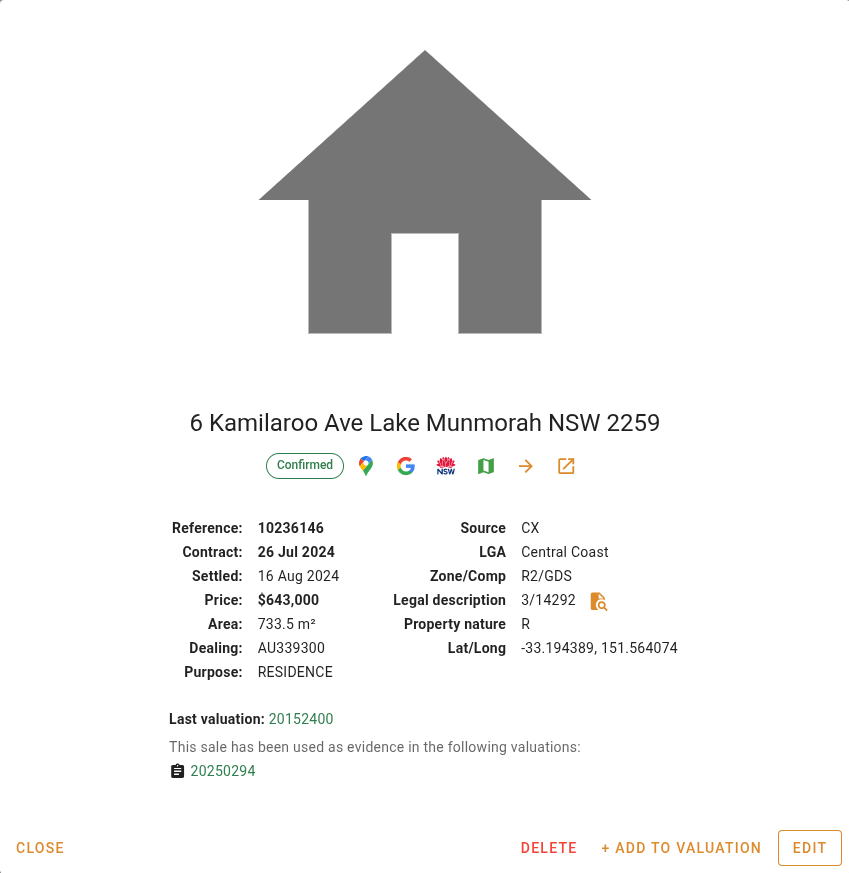
The sale's status is shown as a chip beneath the address. A Provisional chip is shown for provisional sales. A Confirmed chip is shown for confirmed sales and all VG sales. An Unconfirmed chip is shown for sales that have a price and contract date but have not been marked as confirmed.
Links
Open in Google MapsAction
Click the  button to open the sale address in Google Maps in a new browser tab.
button to open the sale address in Google Maps in a new browser tab.Search address on GoogleAction
Click the  button to search the sale address on Google in a new browser tab.
button to search the sale address on Google in a new browser tab.Open in SIX MapsAction
Click the  button to open the property in the NSW SIX Maps portal in a new browser tab. Only visible when the sale has a government property identifier (PID).
button to open the property in the NSW SIX Maps portal in a new browser tab. Only visible when the sale has a government property identifier (PID).Sale fields displayed
| Field | Description |
|---|---|
| Reference | The unique reference number of the sale. Only visible when the sale is a CX record. VG sales do not have a reference number. |
| Contract | The date on which the contract was signed. |
| Settled | The date on which the transaction settled. |
| Price | The sale price of the transaction. |
| Area | The land area of the property. |
| Dealing | The government dealing number associated with the transaction. |
| Purpose | The primary purpose for which the property is used. |
| Source | The source of the sale record, either VG or CX. |
| LGA | The Local Government Area in which the property is located. |
| Zone/Comp | The zone codes and component code assigned to the sale. |
| Legal description | The legal description of the property. |
| Property nature | The nature of the property, such as residential or commercial. |
| Lat/Long | The latitude and longitude of the property. |
Linked valuations
Linked valuations are only visible on company (CX) sale cards. VG sale cards do not display linked valuations.
| Field | Description |
|---|---|
| Last valuation | The reference number of the most recent valuation completed at this property. Displayed as a link that opens the valuation. Only visible when at least one valuation has been completed at the property. |
| Linked valuations | The reference numbers of all valuations that use this sale as evidence, listed beneath the icon. Displays "No valuations are linked to this sale" when none exist. The list is truncated at five items. |
Managing sales
The following actions are available at the bottom of the card. See Managing sales for full details on each.