

Lease form
The lease form is where you view, create, and edit a lease record. It opens as a dialog wherever leases are listed, such as the Leases page, and can also be opened as a full page.
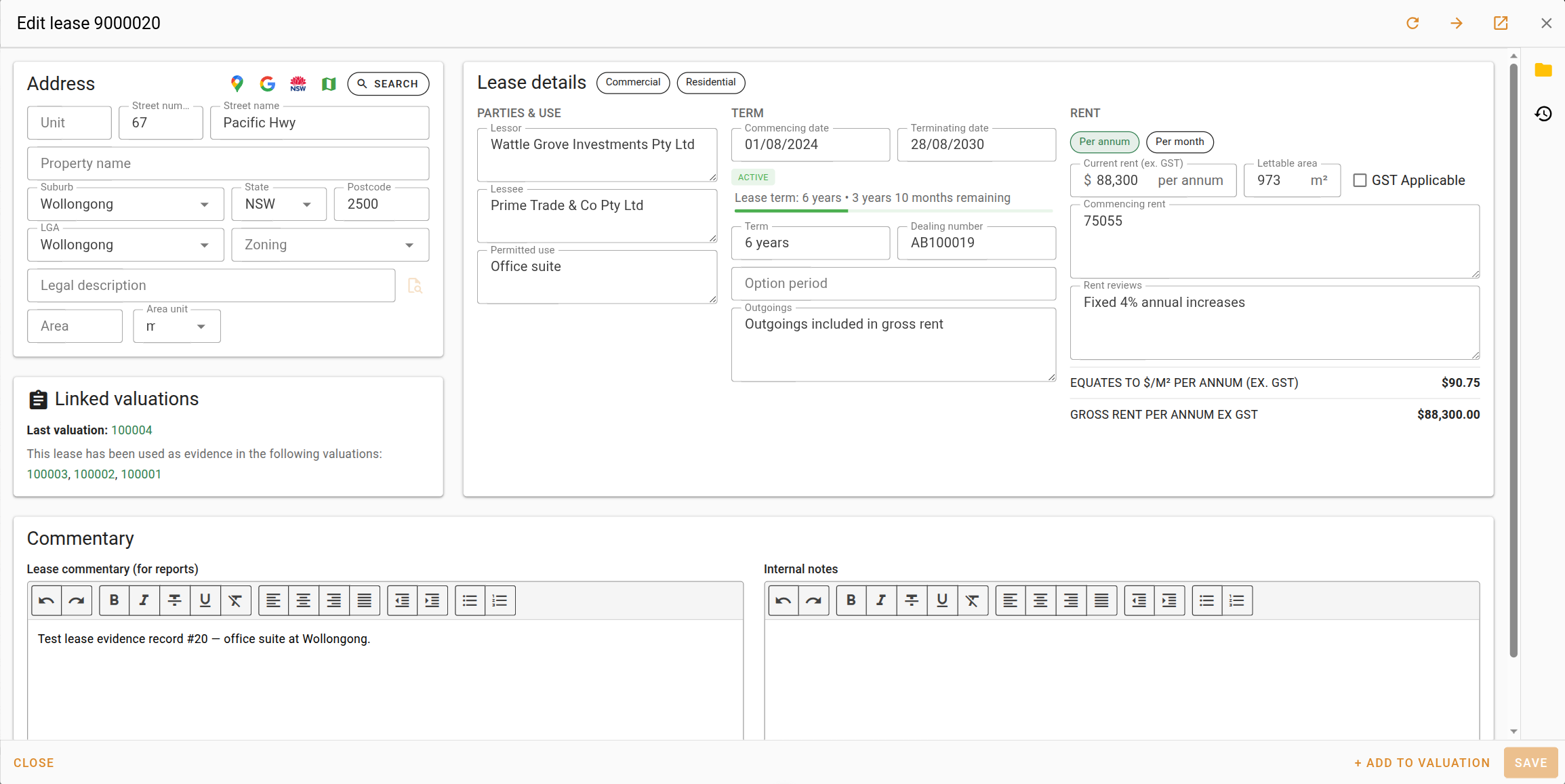
The title of the form shows Create lease for a new lease, Edit lease followed by the lease reference when you can edit leases, and View lease followed by the reference when you can only view them. In view mode every field is read only.
Form buttons
If someone else saves the lease while you are editing it, you are told about the update conflict when you save. You can keep editing, or overwrite their changes with yours. On the full page you can also reload the lease, which discards your changes and shows theirs.
Required fields
While you can edit the lease, a Required fields bar appears above the form listing everything still missing. Click an item in the bar to jump to that field. The bar disappears when nothing is missing.
| Item | Description |
|---|---|
| Address | Shown when the street name, suburb, and LGA are all empty. Once any of these is filled, the ones still missing are listed individually. |
| Commencing date | The date the lease commenced. |
| Terminating date | The date the lease ends. |
| Rental period | Whether the rent is per annum or per month. |
| Current rent | The rent currently payable. |
Address
The address card uses the same address form as sales and valuations, including the address lookup and the map links. See Managing sales for the fields and buttons it contains.
Lease details
The Lease details card holds the details of the lease in three columns, Parties & use, Term, and Rent. Across the top of the card, choose a lease type. The lease types offered are maintained under Settings | Lists | Lease types.
Parties & use
| Field | Description |
|---|---|
| Lessor | The party who owns the property and grants the lease. |
| Lessee | The party who rents the property. |
| Permitted use | The uses permitted under the lease. |
Term
| Field | Description |
|---|---|
| Commencing date | The date the lease commenced. |
| Terminating date | The date the lease ends. It must be after the commencing date. |
| Term | The length of the lease, entered as text, for example "5 years". |
| Dealing number | The dealing number recorded on the lease. |
| Option period | Any option period available under the lease. |
| Outgoings | The outgoings recorded on the lease. |
Below the two date fields, a term readout updates as you type. It shows the lease status, a short description of where the lease is in its term (for example how long remains), and a progress bar showing how much of the term has passed. If the terminating date is not after the commencing date, the readout shows "The terminating date must be after the commencing date." instead.
Rent
| Field | Description |
|---|---|
| Per annum / Per month | Whether the rent you enter is a yearly or a monthly amount. |
| Current rent (ex. GST) | The rent currently payable, excluding GST, for the period chosen above. |
| Lettable area | The leasable floor area in square metres. |
| GST Applicable | Tick this when GST applies to the rent. It does not change the calculated figures below. |
| Commencing rent | The rent at the start of the lease. Free text, so you can record more than a single figure. |
| Rent reviews | The rent review provisions of the lease. Free text. |
| Equates to $/m² per annum (ex. GST) | The gross rent per annum divided by the lettable area. Shows N/A until the current rent, rental period and lettable area are entered. |
| Gross rent per annum ex GST | The current rent expressed per annum, so a monthly rent is multiplied by 12. Shows N/A until the current rent and rental period are entered. |
The last two fields are calculated and cannot be edited. The Equates to figure is the rate shown when the lease is used as evidence in a valuation.
Linked valuations
The Linked valuations card shows every valuation this lease has been used as evidence in. It is read only. A valuation appears here once it has been saved with this lease attached.
| Field | Description |
|---|---|
| Last valuation | The reference number of the most recent valuation completed at this property. Displayed as a link that opens the valuation. Only visible when at least one valuation has been completed at the property. |
| Linked valuations | The reference numbers of the valuations this lease has been used as evidence in. Each reference is a link that opens the valuation. Shows "No valuations are linked to this lease" when there are none. When more than five valuations are linked, the list is truncated and a See more button appears to expand it. |
Commentary
| Field | Description |
|---|---|
| Lease commentary (for reports) | Commentary about the lease that can be used in reports. Its text is copied into the comments when you attach the lease to a valuation. |
| Internal notes | Notes for your organisation only. |
Attachments and events
At the right of the form, a side pane holds two views. Use the buttons at the edge of the form to open the pane, and the button in its header to hide it again.