

Requests
The requests settings provide various options for controlling email functionality alongside the requests module, as well as the use of AI for generating requests from unstructured files and text.
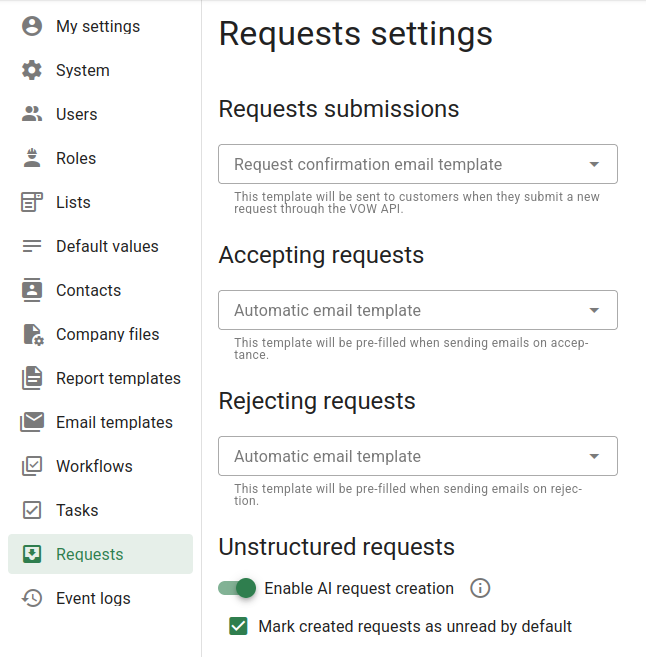
Request submissions
This option allows you to specify an email template to automatically be sent to clients who submit work requests through the VOW requests API. If you use the VOW requests API on your site, this can remove the need to send your own confirmation emails, allowing your requests workflow to function in an automated fashion through VOW. If the dropdown is left empty, no email will be sent to confirm request submissions.
Accepting requests
This option allows you to choose an email template to be automatically pre-filled when a request is accepted by a user in your organisation. If this option is enabled when a user accepts a request, they will be immediately prompted with the email sending dialog, with the relevant template pre-filled and the required contacts entered in the to field. If this dropdown is blank, the email dialog will not be automatically opened, and you will need to manually send any desired emails.
Rejecting requests
This is equivalent to the accepting requests option above, but for the case where a user in your organisation rejects a request, instead of accepting it.
Unstructured requests
The unstructured requests option is used to enable or disable unstructured requests inside VOW. Enabling this setting will allow users in your organisation to drag-and-drop files in the requests page to create new requests using an LLM. For more information on exactly what is enabled from this feature, see Unstructured requests.
This setting doesn't affect the functionality of the VOW requests API. It only enables or disables unstructured request functionality in the VOW UI itself. If you want to disable the VOW requests API, you can scramble your API key in the System settings tab.
When requests are created through the unstructured process, they can be set to mark as unread by default using the second setting. If so, the requests created in VOW from the unstructured method will appear as unread, the same as those sent to VOW from outside the system through the requests API. If this setting is not enabled, unstructured requests will be marked as read when they are created, the same as manually created requests.