

Lists
Lists are mainly used around the system for populating dropdown list boxes or other selection input fields.
You'll see a collection of the lists you can edit, and (assuming you have permission) you can click the name of the list to edit it. When you click the list you'll get a popup looking list this (we're using the Current uses list as an example):
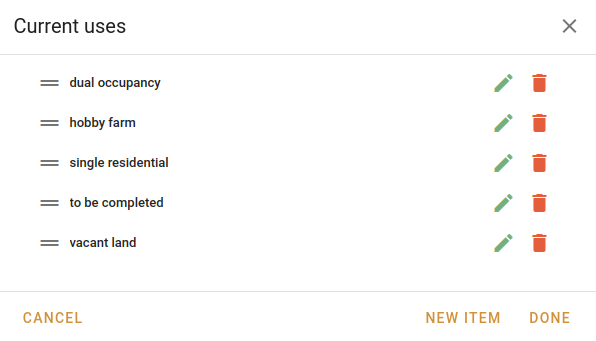
Inside this popup you can:
- Drag and drop the Drag handle
 to reorder the list items.
 - Click Edit
 to edit the item.
 - Click Delete
 to remove the item from the list. You'll be asked to confirm that.
 - Click New item to open a popup and enter the new details.
- Click Done to keep any changes you've made to the order of items.
Your additions, updates and removals will be immediately sent to the database. However, reordering isn't kept unless you click the Done button.
The item edit boxes all have a fairly similar structure, with at least a name and an Active switch. If there are any extra fields, they'll be noted in the list below.
| Name | Usage | Notes |
|---|---|---|
| Area units | Dropdown lists where area units can be selected, such as an address form. | This item type also includes a display field where you can instruct the system to display (say) "m²" instead of "square metres" in reports. |
| Attachment types | Used in the Job | Building | Occupancy | Style attached dropdown. | |
| Branches | Used in Branch dropdowns throughout the system. | |
| Car accommodation | Used in the Job | Building | Occupancy | Car accommodation dropdown. | |
| Client referral types | Used in the Job | Details | Client details | Other client details | Referral type dropdown. | |
| Current uses | Used in the Job | Summary | Main building | Current use dropdown. | |
| Device types | Used in the Job | File | Valuation information | Data entry dropdown. | |
| Document types | Used in the Job | Value | Valuation details | Documents dropdown, which becomes visible when the Job | Value | Valuation details | Documents to sight switch is turned on. | |
| Encumbrances | This list is not used in any dropdowns. | |
| Environmental issues | This list is not used in any dropdowns. | |
| External conditions | Used in the Job | Building | Occupancy | External condition dropdown. | |
| Fixtures and fittings | Used in the Job | Building | Occupancy | Fixtures & fittings dropdown. | |
| Floor types | Used in the Job | Building | Occupancy | Main flooring dropdown. | |
| Interests valued | Used in the Job | Value | Valuation summary | Interest valued dropdown. | |
| Interior Linings | Used in the Job | Building | Occupancy | Main interior linings dropdown. | |
| Internal conditions | Used in the Job | Building | Occupancy | Internal condition dropdown. | |
| Internal layouts | Used in the Job | Building | Occupancy | Interior layout dropdown. | |
| Job statuses | Used in the Job | File | Valuation information | Job status dropdown. This is also used to make the columns in the valuations column view. | There is one extra switch when editing a job status. Show jobs in this status means that jobs in this status will appear in the valuation column view. |
| Job types | Used in the Job | File | Valuation information | Category dropdown. | |
| Levels | Used in the Job | Building | Occupancy | Style leveled dropdown. | |
| LGA | Used in the Job | Details | Address | LGA dropdown and any address panel. | This item type includes a name as well as a code. |
| Main building types | Used in the Job | Summary | Main building | Main building type dropdown. | |
| Market activity levels | Used in the Job | Sales evidence | Current/proposed sale of property | Market activity level dropdown. | |
| Market conditions | This list is not used in any dropdowns. | |
| Market directions | This list is not used in any dropdowns. | |
| Neighbourhood descriptions | This list is not used in any dropdowns. | |
| Parties | This list is not used in any dropdowns. | |
| Payment methods | Used in the Job | Details | Invoices | Invoice payment | Payment method dropdown. | |
| Property identification methods | Used in the Job | Details | Invoices | Invoice payment | Payment method dropdown. | |
| Property natures | This list can be used when searching for sales. | This item type includes a name as well as a code. |
| Property types | Used in the Job | File | Property details | Property type dropdown. | |
| Quote rejection reasons | Used in the Reject quote popup so that you can record the reason for which the quote was rejected. | |
| Quote cancellation reasons | Used in the Cancel quote popup so that you can record the reason for which the quote was cancelled. | |
| Report phrases | Used when editing reports created within VOW. The items in this list can be included verbatim into the report at cursor's position. | This item type includes a phrase name as well as the actual phrase. |
| Report types | Used in the Job | File | Valuation type | Report type dropdown. | |
| Roof types | Used in the Job | Building | Occupancy | Roof dropdown. | |
| Sale types | Used in the Sale | Contract | Sale type | Roof dropdown when creating or editing a sale. | |
| Services | This list is not used in any dropdowns. | |
| Street appeals | Used in the Job | Building | Occupancy | Street appeal dropdown. | |
| Significant ancillary | This list is not used in any dropdowns. | |
| Valuation purposes | Used in the Job | File | Valuation type | Report purpose dropdown. It also appears when creating and editing quotes, and when filtering financial reports. | |
| Walls | Used in the Job | Building | Occupancy | Main walls dropdown. | |
| Windows | Used in the Job | Building | Occupancy | Window frames dropdown. | |
| Zone effects | This list is not used in any dropdowns. | |
| Zones | Used in the Job | Details | Address | Zoning dropdown and any address panel. | This item type includes a name as well as a code. |
| Zoning instruments (LEP) | Used in the Job | Details | Address | Instrument dropdown and any address panel. |