

Full search
The Full search is a more in-depth and complex search. It contains an input text box with a dropdown list of the various fields you can search by. When you have selected your field you can then select a comparator. The comparator text box will contain a dropdown list of all the different comparators that are available for that search field.
Some fields will show a different list of comparators used to filter your search results.
After choosing a comparator you can then enter the value(s) you wish to compare the fields to.
Another field text box will appear under the first where you can choose another field to include in your search.
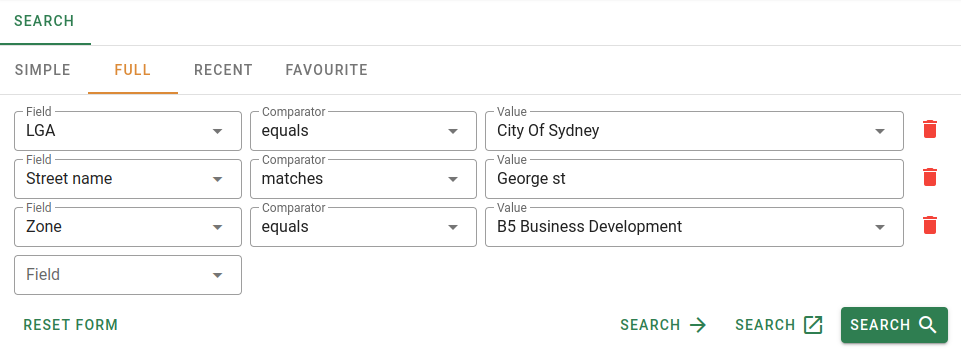
You can remove any unwanted criteria using the Delete button found at the end of each row.
Like the simple search there are three different search buttons that when clicked will take you to your search results.

The Open in full page search button will go to the results as a full page.
The Open a new tab search button will go to the results in a new browser tab as a full page.
The Open search button will go to the results as a tab in the same page, allowing you to open multiple searches at once in the same page.
You can clear the all the search fields by clicking the Reset form button at the bottom left of the form.

Search fields
To select a field to include in your search, click the input text box and choose from the available fields presented in the dropdown list.
The fields that are available for you to search by are:
| Field | Data type | Description |
|---|---|---|
| Sale ref | Number | Sale reference number |
| Area | Number | Area. Can be in (m)etres or (h)ectares. |
| LGA | Selection | District (LGA). |
| Contract date | Date | Contract date. Choose the date from the calender. |
| Street / House number | Text | Street / house number. |
| Dealing number | Text | Dealing number. |
| Legal description | Text | Legal description. |
| Lot/Plan number | Number | Lot or plan number. |
| Plan number | Number | Plan number. |
| Plan type | Text | Plan type. DP / SP. |
| Component | Text | Component. |
| Interest | Text | Interest. |
| Property nature | Selection | Nature of the property. Choose from the selection. |
| Notes | Text | Sales notes. |
| Property ID | Number | Property identification number (PID). |
| Postcode | Number | Postcode. |
| Price | Number | Sale price. |
| Legal description | Text | Legal description. |
| Property name | Text | Name of the property. |
| Property type | Selection | Type of property. Choose from the selection. |
| Purchaser | Text | Purchaser of the property. |
| Property / primary purpose | Selection | The purpose of the property. Choose from the selection. |
| Sale code | Text | Sale code. |
| Settlement date | Date | Date of settlement. Choose a date from the calender. |
| Source | Selection | Source of the sale. Company sales or Property NSW sales. |
| Strata lot number | Text | Strata lot number. |
| Suburb | Text | Suburb. |
| Street name | Text | Street name. |
| Vendor | text | Sale vendor. |
| Unit number | Number | Unit number. |
| Land value | Number | Current land value of the property. |
| Zone | Selection | Property zones. Choose from the selection |
Comparators
For information on comparators and how they work, go to Comparators