

Set up requests
Included with Professional and Enterprise
A request is an instruction that has not become a job yet. Staff accept a request to turn it into a quote or a job, or reject it. Your website's enquiry form can send requests straight into VOW.
Skip this task if you do not take instructions through a web form. Staff can still create requests by hand with New request on the requests page, once they have the permissions from Give your staff access to quotes, email and requests.
Before you start
Find out who looks after your website. They need the API key you create here and the Request API reference to connect your form to VOW.
Create your API key
- Open Settings | System.
- In the Security card, under Requests API key, click Generate API Key.
- Click the button to copy the key and send it to your web developer.
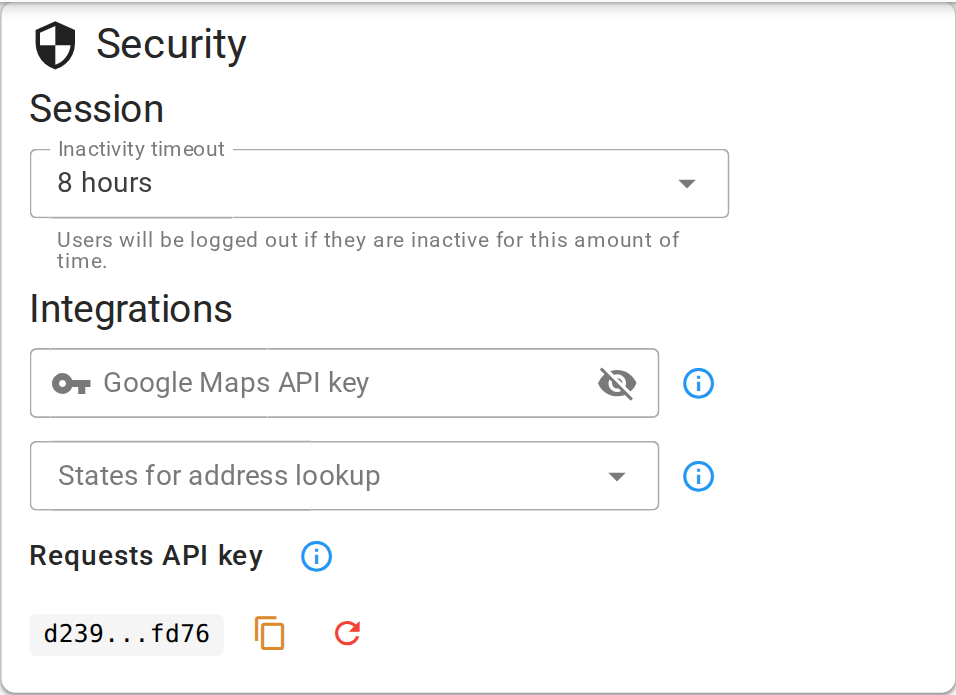
Creating your requests API key
Treat the key like a password. If it leaks, click the button to replace it. The old key stops working straight away, so your website needs the new one before it can send requests again.
Confirm your setup
The card shows your key with the middle masked. Ask your web developer to submit a test enquiry from your website. It appears on the requests page.
For the request inbox and editor, see Requests.