

The VOW API key
A VOW API key can be used by an external application to connect to VOW.
Your API key is unique to you, and should not be shared.
The most common use case for the VOW API key is for editing cloud files on your computer, using Word or Excel, via the VOW Helper. See Editing documents for the helper install and usage guides.
Getting a VOW API key
To generate an API key, go to Settings | My settings and look for the API key section in the Security panel.
If you don't have an API key yet, it'll look like this:

Click the Refresh button to generate a key. You should now see your api key appear like this:
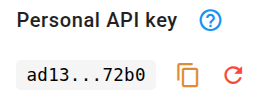
You can use the button to copy the key to your clipboard to paste into an external application.
Replacing your API key
Treat the key like a password. If it ever leaks, click the button again to replace it. The old key stops working straight away.
Rolling your key doesn't update the applications that use it. Paste the new key into the VOW Helper on every computer you use it on (the helper keeps a separate key for each VOW server, so update the one for the server you rolled it on), and into any other application or integration that connects to VOW with your key. They can't connect again until you do.